You can register or sign in here.
Please click on “Login” in the top right-hand corner.
suchen:
We want to make it as easy as possible for you to buy tickets for our performances! Our webshop is intuitive and offers many options for purchasing tickets. We have compiled all information on registration, ticket purchases, and discounted offers for you here.
To the Volksoper Vienna webshop
At the bottom of the page, you can switch from German to English by clicking on the flag icon.

You can register or sign in here.
Please click on “Login” in the top right-hand corner.

The Volksoper Vienna operates its ticketing system jointly with the Vienna State Opera and the Burgtheater. If you have already registered for online purchases with one of these institutions, you can also use your account to make purchases at the Volksoper Vienna.
If you do not yet have an account, you can register as follows:
In the “NEW CUSTOMER” section on the right, click on “Register”.
You will then be taken to the registration page.
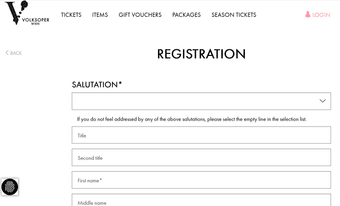
Enter your details and set a password. The password must be at least 8 characters long, must not be part of your email address, and must meet the following requirements: at least one uppercase letter, one lowercase letter, one number, and one special character.
Click “Create account” at the end.
You can now purchase and pre-order tickets in the Volksoper Vienna webshop (as well as those of the Vienna State Opera and the Burgtheater).
As part of the registration process, you also have the option to subscribe to our newsletters. Please note that the newsletter subscription is only completed once you have clicked on the confirmation link sent to the email address you provided during registration.
To set a new password, please follow these steps:
Kindly email us at tickets@bundestheater.at or contact us by phone at +43 1 514 44-2222 (Mon–Sun, 10 AM–7 PM).
Tickets for the entire following month go on sale from the first day of each month, provided that day does not fall on a Saturday, Sunday, or public holiday. For example, tickets for all performances until the end of October can be purchased starting at the beginning of September. Tickets for September are already available from the beginning of June.
Before the official sale begins, you can pre-order tickets for our performances. Please note that pre-orders are only possible until the 25th of the month before last. In the webshop, events that are available for general sale or pre-order are marked with the corresponding button (Buy tickets, Order tickets).
For pre-orders, you will receive a confirmation or rejection as soon as possible. In the case of confirmation, you will also receive information on payment and collection of your tickets. Tickets for dress rehearsals are excluded from pre-ordering.
Use the dedicated login in the registration area for these two groups. Please note that you will only see the offers for patrons and subscription holders in this section. If you would like to purchase tickets through the regular sale as well, please log in under “Returning customer” on the left side.
Please log in to the webshop. Select the performance you want and click on “Buy tickets” or “Remaining tickets”. (The “Remaining tickets” option appears when only a few tickets are still available for a performance.) The seating plan will then open.
Please select your desired seats on the seating plan. The magnifying glass icons in the top right corner of the seating plan allow you to zoom in and out.
A window will then open where you can choose the ticket type and any applicable discounts. Click the button showing the price. The window will close. You will now see your selected ticket(s) in the top right next to the seating plan. Please click “Add to shopping cart” to proceed.
Alternatively, you can click on “To the best seat booking”. You will then see the available price categories and can use the “+” and “–” buttons to select the number of tickets and any applicable discount. Then click “Add to shopping cart” at the bottom. In this case, we will automatically select the best available seats for you and add them to your cart.
Next, please select a shipping option: Do you want to receive your ticket digitally (e-ticket – print@home and/or Wallet), pick it up at the box office (Collection), or have it sent by post (Versand)? Please note that the Shipping option is only available for ticket purchases made at least 10 days (domestic) / 14 days (international) before the performance.
Next, please acknowledge our Terms and Conditions by checking the corresponding box.
Click “Continue” to proceed to the payment section.
If you have not done so already, you will now be prompted to login or register. (See “Not yet a customer and would like to buy tickets or register?” for details.)
To redeem any promotional codes, please use the “CUSTOMER NUMBER / PROMOTION CODE” field and click “redeem”.
Select your preferred payment method for the remaining amount and then click “Buy now”.
If you need assistance with the purchase process, please contact us at tickets@bundestheater.at or call +43 1 514 44-2222 (Mon–Sun, 10 AM–7 PM).
Once you have added seats to your cart, you will see the contents of your cart and any additional offers, such as the programme booklet for the selected performance. You can add these additional items to your cart by selecting the desired quantity and then clicking “Add to shopping cart”.
You can also click directly on the “Items” tab at the top of the page. You will then be taken to an overview page of all available items. Select the item you want and click the “More info” button.
You can now choose the desired quantity of the selected item. Please then click “Add to shopping cart”.
Continue the purchase process as described under “How to purchase a ticket?”.
Click on the “Gift Vouchers” tab at the top of the webshop. Enter the value of the gift voucher in the “Value (€)” field and the number of vouchers you want at this value. Then click “Add to shopping cart”.
You are now in the shopping cart and can proceed with the purchase process. See also “How to purchase a ticket?”.
Select your desired seats and add them to your cart (see “How to purchase a ticket?”).
In the payment section, you can redeem your discount code in the “ CUSTOMER NUMBER / PROMOTION CODE ” field. Enter your customer number or promotion code and then click “redeem”.
The total amount will be reduced according to the discount applied.
Please make sure to complete the payment only after the reduced price is displayed.
If you want to redeem a gift voucher (gift or goodwill voucher), you can do so by entering the voucher number (TAN) in the “Gift Voucher” field.
For any remaining balance, select your preferred payment method and then click “Buy now”.
Please make sure to complete the payment only after the reduced price is displayed.
If you need assistance with the purchase process, please contact us at tickets@bundestheater.at or call +43 1 514 44-2222 (Mon–Sun, 10 AM–7 PM).
We look forward to your visit and hope that all your questions regarding ticket purchases and our webshop have been answered!


